overview
Contextune gives customer-facing AI agents behavioural context they normally can't see, so they can respond to what the user is doing, not just what the user typed.
It captures a live view of what the user is doing in the browser, the pages they visit, where they click and scroll, where they hesitate, and injects it into the agent's context window. The agent can then infer intent from behaviour instead of from the latest message alone.
It's built for cases where what the user just did on the page changes what the agent should say: travel concierges, in-product support agents, and ecommerce shopping assistants.
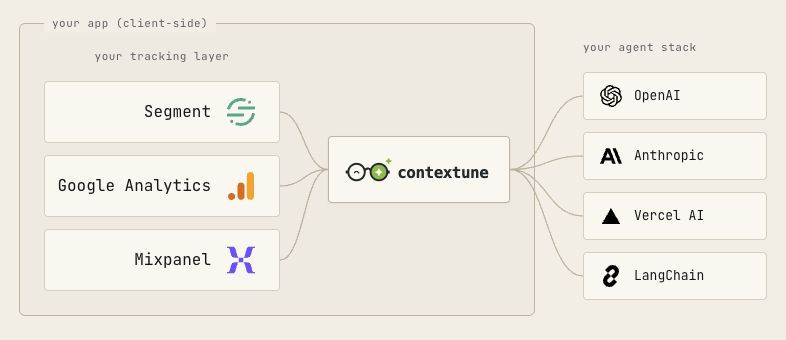
@contextune/sdk is the client-side piece. It maintains that behavioural profile in the browser and exposes it as structured JSON, or TOON ↗ for a more token-efficient format, that you can drop into your model's prompt. It runs in plain JavaScript or TypeScript with no framework or model assumptions.
It's MIT-licensed and runs entirely in the browser. The snapshot lives in memory in the user's session; nothing is sent anywhere by default, and we never see it.
import { Contextune } from '@contextune/sdk';

Contextune.init();
const snapshot = Contextune.getSnapshot();
// inject snapshot into your agent's system promptUsing a coding agent? Add with your agent → wires the integration from a single prompt. No key to mint.
two modes
The SDK works in two modes that can be combined freely:
- Network-intercept mode — set
source: 'ga4','segment', or'mixpanel'and the SDK taps your existing analytics stream. Events from that provider flow into the event log automatically, alongside anytrack()calls you make directly. - Direct-call mode — omit
source. OnlyContextune.track()andContextune.page()calls populate the log. Nothing patches your network transports.
what the snapshot contains
Every block is optional.
- event_log — a rolling FIFO window (50 events by default) of page views and custom
track()calls, each with elapsed seconds and sanitised properties. - marketing_params — UTM source / medium / campaign / term / content, referrer, landing page. Captured once at init; all URLs pass through the sensitive-key redactor.
- device_info — viewport, user agent, language, platform, device type. Read from
navigatorandwindowat snapshot time.
next steps
- Install & getting started — three lines, no signup.
- Configuration — every
init()option and every snapshot field. - API reference — per-method signatures with params and examples.
- Access patterns — system-prompt injection and raw access.
- Custom events —
Contextune.track()and how it relates to source plugins. - Subscriptions — react to every event log addition in real time with
Contextune.subscribe(). - Security — prompt-injection defence, redaction, sanitisation boundary.